Stop counting votes: what feature requests are really telling you
Picture the planning meeting. Someone shares the feedback board, sorted by votes. "Export the monthly report to Excel" is at the top with 212 votes, well clear of everything else. The room nods, the export gets built, and three months later the customers who asked for it are still unhappy.
Nobody in that room made a bad decision with the information they had. The trouble is the information. A vote count feels like data, but it answers a narrower question than the one you're asking. It tells you how many clicks a sentence collected. It doesn't tell you what those people needed, who they are, or whether you're already working on it.
What a vote count hides
The need. A feature request is a solution somebody guessed at. "Add an Excel export" is one customer's idea of how to fix something. Ask the people behind it what they're trying to do, and many of them say the same thing: they need to get month-end numbers to their accountant. Some would be better served by a scheduled email, or by giving the accountant read-only access. The export was never the point. When you rank requests, you rank guesses. When you find the need, you get to choose the best answer.
The people. Votes count enthusiasm, not customers. Twenty people from one account can outvote ten accounts that each have one person on your board. Your ten largest customers and ten people trying your free plan look identical in a total. And the same customer who voted on the board, mentioned it in an interview and raised a support ticket is one customer, not three.
What's already happening. The board doesn't know your roadmap. The most useful fact about a request is often "nothing we're working on answers this", and a vote count can't tell you that. Neither can it tell you the reverse: that a big project in flight has no customer asking for it.
Time. All-time totals only go up. A request that was hot two years ago keeps its lead long after anyone cares, while this month's urgent need starts at zero.
What to count instead
Here's what we'd put on the screen in that planning meeting instead:
- Customers per need. Group requests by the need behind them, and count the distinct customers who share each need, across the board, interviews, support tickets and sales notes.
- Which customers. Split that count by what matters to your business: plan, size, segment. "Eleven customers, four of them enterprise" is a different conversation from "eleven customers, all on trial".
- Needs nothing answers. Put each need next to the work in flight. A need many customers share that nothing addresses is the most valuable row on the page.
- New supporters per week. Watch how many people get behind a need each week, not the all-time total. Momentum tells you what's growing.
- Time to first reply. How long do people wait to hear back? If the answer is "forever", the board is teaching your customers that asking is pointless.
Now the sentence in the planning meeting changes. It's no longer "212 votes for Excel export". It's "eleven customers, four of them enterprise, can't get their numbers to their accountant, and nothing on our roadmap solves it." That sentence wins the argument, and it survives the follow-up questions.
Make votes mean something
There's still a place for votes. They're a useful signal of priority, as long as they cost something.
When voting is free, people vote for everything that sounds nice, and every request collects a steady trickle of polite approval. Give everyone a small budget instead, say seven votes with at most three on any single request, and a vote starts to mean "this is in my top handful". Let people take votes back freely, so the budget always reflects what they want now.
A budget also changes how customers use the board. Instead of skimming and upvoting, they compare. That comparison is exactly the information you wanted.
Close the loop, including the no
The reason people come back to a board is to find out what happened. Tell them. When a request is planned, say so and say roughly when. When it ships, tell everyone who asked.
And when the answer is no, say that too, with a reason. A no with a reason keeps the customer. Silence loses them. The request doesn't disappear either: it's still evidence of a need, and if the same need keeps coming up, that's worth knowing the next time you plan.
When counting votes is fine
To be fair to the humble upvote: if you have a handful of customers you know by name, you don't need any of this. Talk to them. And for small, well-defined improvements ("let me sort this table by date"), a plain vote tells you what you need to know.
The method matters when you have more requests than you can read in a sitting, customers you don't know personally, and a roadmap with real trade-offs. That's most product teams past their first year.
How we built this into Outcomify
We run product discovery in Outcomify, so we built a feedback board that works this way. It's a public page where your customers post requests, vote and follow what happens. What happens after you approve a request is the part other boards don't do.
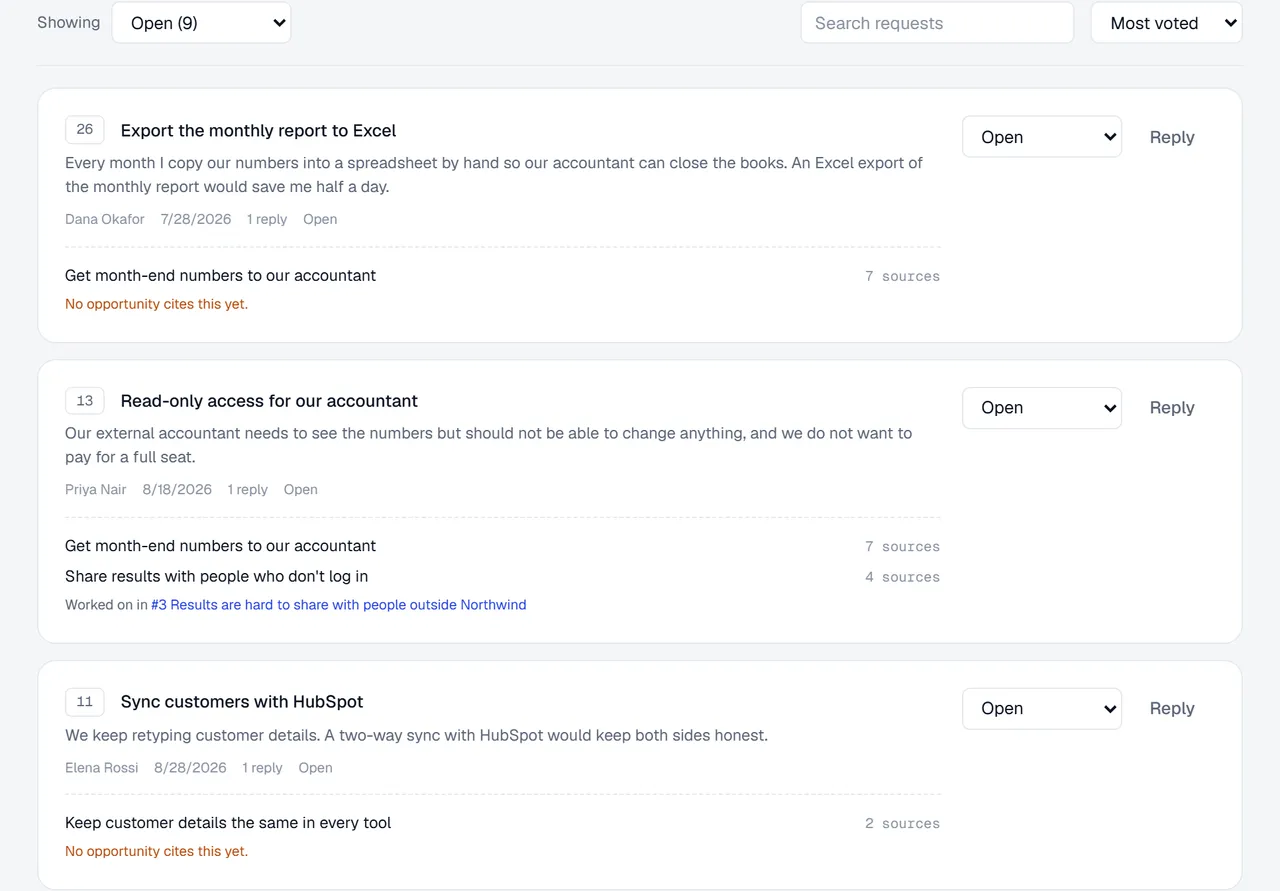
The inbox of a demo board. "Export the monthly report to Excel" and "Read-only access for our accountant" turn out to share one need, backed by seven sources, and nothing on the roadmap answers it yet.
- Every approved request becomes evidence. Canopy, Outcomify's built-in AI, reads it into the customer needs in your research, next to your interviews and tickets. The same need is counted once, however many ways people ask for it.
- Each request shows what's working on it. The inbox shows the needs a request turned out to be, and the opportunities in your Opportunity Solution Tree that cite them. When nothing does, it says so: "No opportunity cites this yet."
- Votes come from a budget. Seven by default, up to three on any one request, free to take back.
- Everyone hears back. Move a request with a note, or reply to a question, and the person who asked gets it by email, in your words.
- The report shows whether the board is working. Requests, new supporters and what shipped, week by week. How long people wait for a first reply, and who is still waiting. Narrow it to your enterprise accounts, or any group your customer data describes, and every number follows.
- It's MCP-enabled. Connect Claude, Cursor or any MCP client to the board and ask "what do customers ask for that nobody has picked up?" With your permission it can also approve, reply, move and merge requests, and it shows you a reply before posting it.
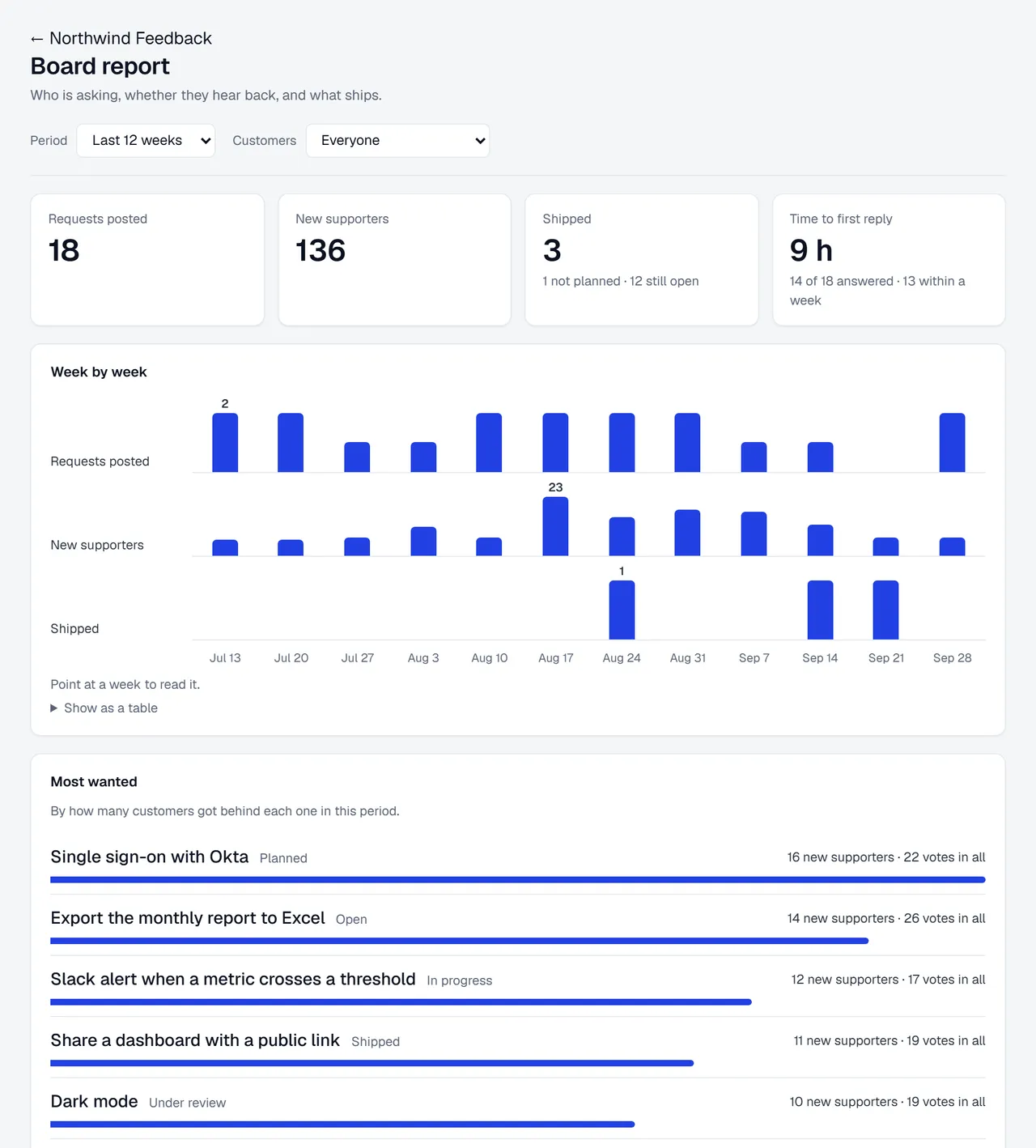
The board report: whether people are still asking, whether they hear back, and whether what they ask for ships.
There's more for the team that runs it: your own login so customers arrive already known, an API and webhooks, alerts when requests are waiting, merging duplicates, and an Excel export that includes the needs behind every request. The feedback board page has the tour, and how to prioritize feature requests walks through the method step by step, whichever tool you use.
If you're weighing up boards, we've also written an honest comparison with Canny, including when Canny is the better pick.
Outcomify is free during our pilot. You can set up a board in a couple of minutes. It starts as a draft that only your team can see, until you publish it. Or look at our own board first: it's where our customers tell us what to build next.