Free customer survey
Ask your customers. Get findings, not a spreadsheet.
Send a short survey to the people you build for. Outcomify reads what they write into the needs behind it: how many said each, in their own words. Their other answers split by plan, role or anything else on your list. It all lands next to your interviews and your feedback, where your next decision gets made.
Free. No credit card required.
- Get month-end numbers to our accountant without retyping them9 of 23
“I copy every total into a spreadsheet by hand so she can close the books.”
- Know which invoices are still unpaid before the month closes6 of 23
“I find out a customer hasn’t paid when the accountant asks me.”
How it works
From a question to a finding.
Four steps, and everything saves as you go, so you can leave halfway and come back.
Write a short survey
Start from a template, or let Canopy draft one from an opportunity you know too little about. Canopy reviews your questions for wording that biases answers.
Send it in your name
Paste your customer list or upload a CSV. The email carries your company’s name and replies come to you. Or share an open link.
Try it on a few first
Send it to a random few and see where people stop or skip. Fix the question, then send it to everyone else.
Read what they need
Closed answers count as people send them in. Canopy reads the open ones into needs, with quotes and how many people said each.
Writing it
Short questions people can answer honestly.
A survey people finish beats a thorough one they abandon. The editor keeps it short and asks each person only what applies to them.
Canopy reviews your questions
Two questions in one, a leading word, a scale that only goes up: Canopy spots them and suggests a rewrite you apply with one click.
Only what applies to them
Show a question only to people who gave an answer earlier, or whose plan, industry or any other column has a value you pick.
See every path at a glance
The survey map shows who gets which questions, and the editor says how long the longest path takes.
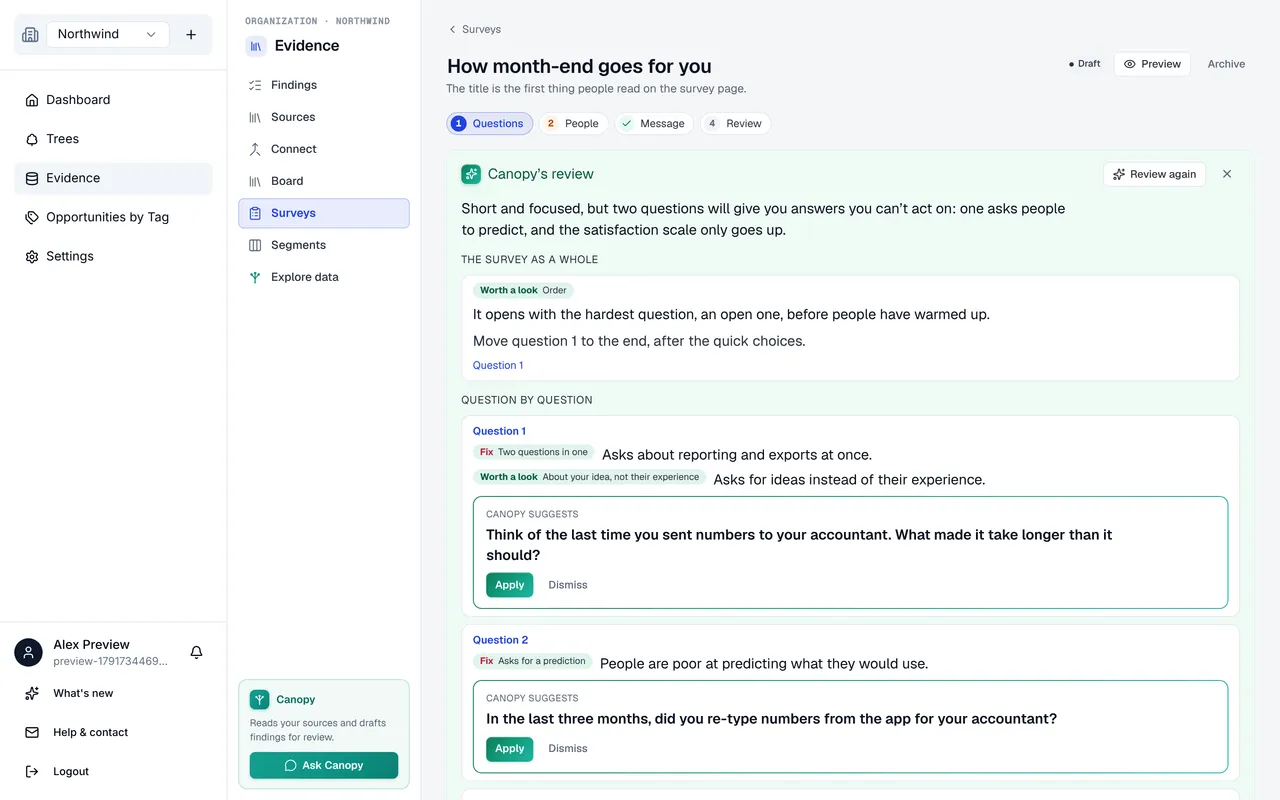
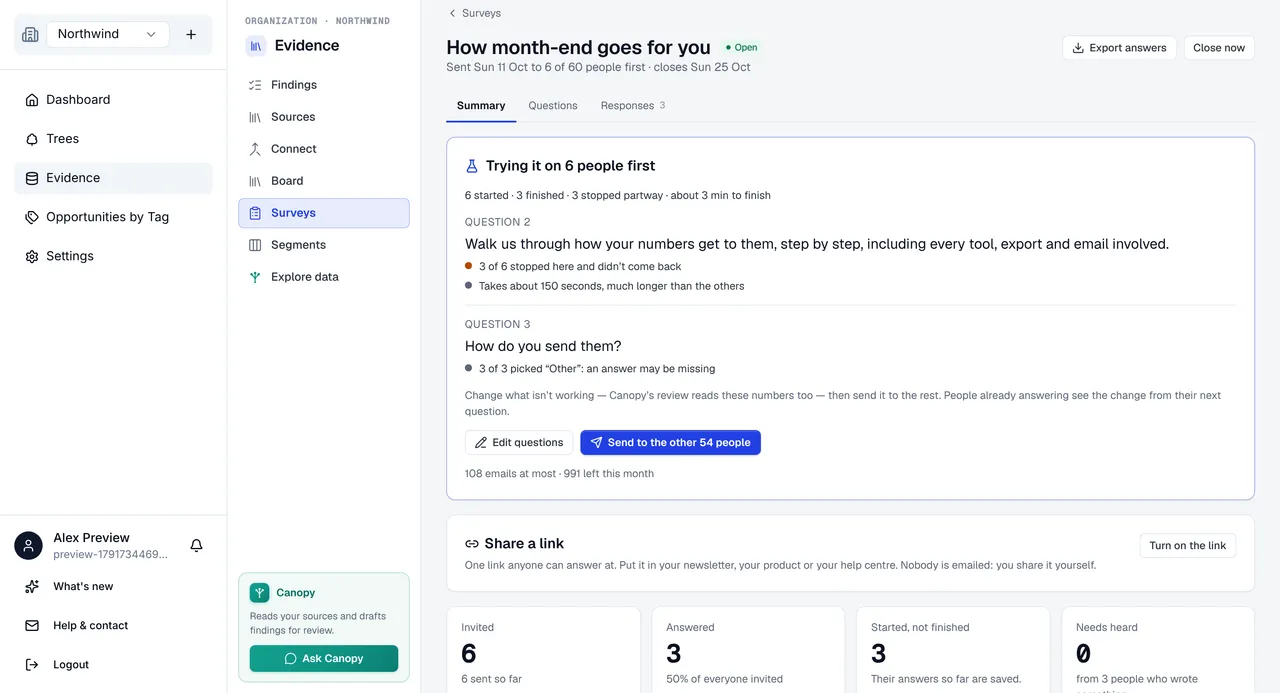
Try it on a few people first
Find the confusing question before everyone sees it.
Send it to a random few on your list and hold the rest. Their results show, question by question, where it isn't working.
Where people give up
People who stopped at a question and didn’t come back, and optional questions many of them skipped.
A missing answer
When many pick “Other” or “Don’t know”, the answer they wanted to give probably isn’t on the list.
Fix it, then send the rest
Change the question. Answers to the old wording are kept apart, so they never mix with the new ones.
What your customers see
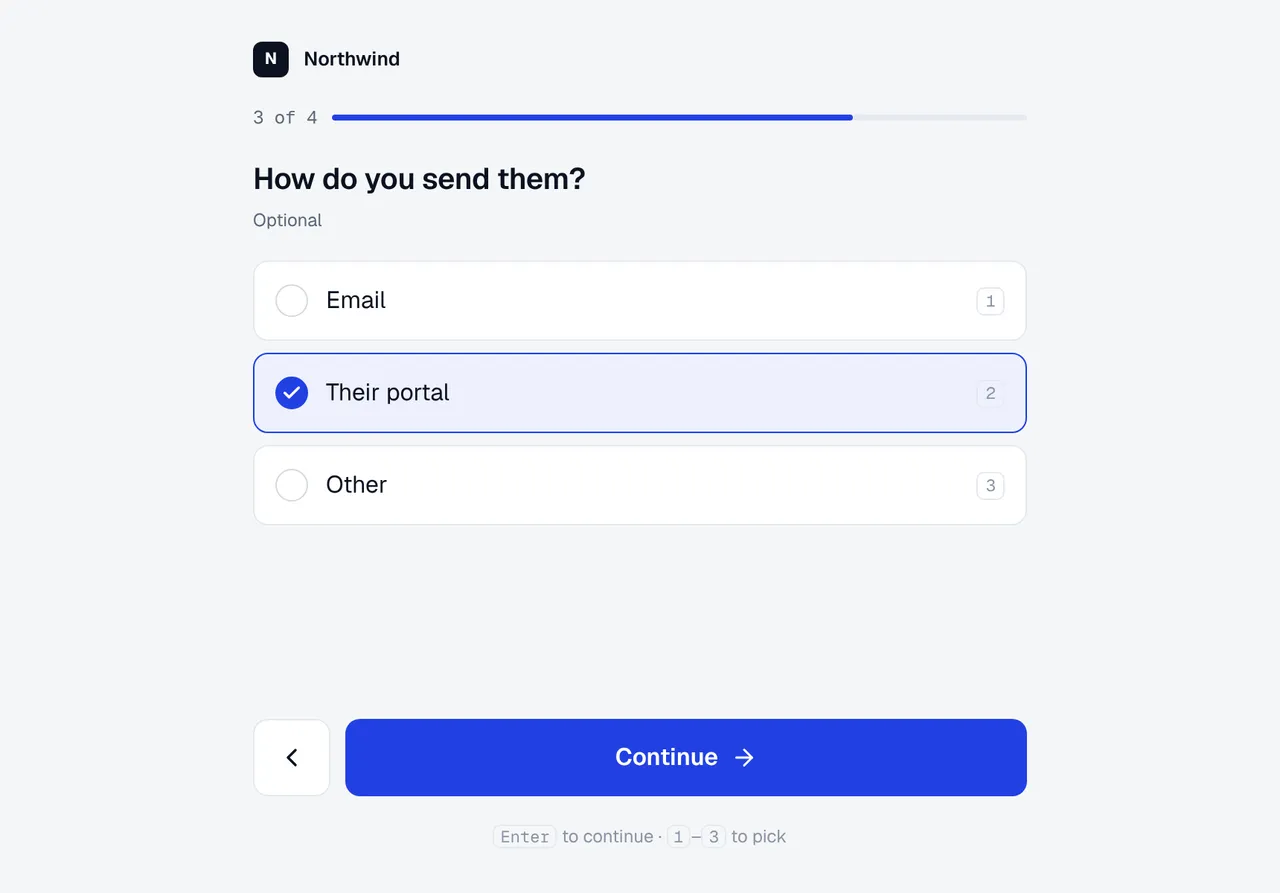
One question at a time, in your name.
An email in your company's name, then a calm page that says how long it takes, asks one thing at a time and saves as they go.
On a phone or a computer
Big answers to tap on a phone, keyboard shortcuts on a computer, and nothing to sign in to.
Honest about the time
The email and the page say how many questions and minutes it takes, for the longest path through it.
One reminder, never more
People who haven’t answered get one reminder, 1 to 14 days after you send, and every email has an unsubscribe link.
What you get back
Findings with counts. Every quote traceable.
The results lead with what customers need, before any chart.
Needs, in their words
Counted by person
Canopy reads every open answer into the needs behind it. One person saying it five ways is one voice, and each need opens in Findings on the answers it came from.
“Every month I copy each total into a spreadsheet so our accountant can close the books.”
“The export doesn’t match what she needs, so I retype it.”
“Month-end is a day of copying numbers, not running the business.”
Compare by segment
Split by any column
The columns of your list become segments, and every choice question splits by them, each group with how many of its people answered. Every share is out of the people who answered that question, so a follow-up only some people saw is never measured against everyone.
Templates
Start from a survey that works.
Each one is short on purpose: at most eight questions on any one path, and no more than two open ones. Change anything.
Discovery pulse
What customers are trying to get done, and what gets in the way.
Why did you stop?
For customers who cancelled or went quiet: what made them leave, and what would have kept them.
First week
For new customers after their first week: what they hoped for, and where they got stuck.
Follow up on a request
For people who asked for something: what they need, and how they manage without it.
Jobs and tools
Short and closed: who your customers are and what they use.
Drafted by Canopy
On an opportunity with thin evidence, Ask your customers drafts the questions that would fill the gap.
MCP-enabled
Let your agent draft it. You send it.
Connect Claude, Cursor or any MCP client to Outcomify and it can draft a survey, add the people, and read the results back. Sending stays with a person: an owner or admin sends every survey from Outcomify.
Everything else
Built for asking real customers.
An open link
Share one link in a newsletter or your help centre, or embed the survey on a page of yours, for people who aren’t on a list.
A test email and a preview
See the email in your own inbox and the page as a customer sees it, before anyone gets it.
A clean list
Duplicates, malformed addresses and people who unsubscribed are left out, each with the reason.
Excel export
Every finished response, one row per person with their columns from your list. Never an address.
Erase on request
Remove a person, their answers and the evidence made from them, for good.
A sealed list
Addresses and names in your customer list are stored encrypted. Your team sees names and segments, never a full address.
Close when you choose
Set a close date up to 90 days out, or close it early. Invitations not yet sent stop with it.
Cite it on the tree
A survey drafted from an opportunity offers each need it heard as evidence for, or against, that opportunity.
Only owners and admins send
Anyone in the workspace can write a survey. Sending is confirmed like adding a member.
Free
Free, within these limits.
- 3surveys out at once
- 250people per survey
- 1,000emails a month, reminders included
- 12questions per survey, up to 3 open
An open link takes up to 500 people. The survey page and the email carry a small Outcomify link, and Canopy's reading shares your workspace's monthly AI allowance.
The honest take
When a form builder is the better tool
If you need a long questionnaire, a quiz, payments or file uploads, or respondents bought from a panel, a general form builder does that well. Outcomify is for emailing your own customers and users: before you send, you confirm the list wasn't bought, rented or scraped.
Outcomify's survey is for product teams who want a few honest answers from their customers to turn into evidence: the need, how many share it, and the opportunity it supports.
Frequently asked questions
Outcomify customer surveys
Keep exploring
Surveys help
Step by step: writing, sending, trying it first and reading the results.
Customer interviews to opportunities
The other half of your evidence: what customers tell you in conversation.
Customer feedback board
Let customers post and vote; every request becomes the need behind it.
What is an Opportunity Solution Tree?
The map your survey’s findings connect to.
Assumption testing
A survey is one way to test what you believe about your customers.
Connect your AI agent
Let Claude or any MCP client draft surveys and read what came back.
Ask the people you build for.
Pick a template, paste your list, and see what they need. Nothing goes out until you press send.