Try it on a few people first
Send to a random few, see where people stop or skip, fix the questions, then send it to everyone else.
A question that confuses people costs you their answers. Sending to a few people first finds it while only they have seen it.
Send to a few
On the Review step, tick Try it on a few people first and say how many. Outcomify suggests a tenth of your list, at most 20, and it is always fewer than the whole list. They are picked at random, so they are like everyone else on it. The option is there for any list of two people or more.
Only the few are emailed. Everyone else waits until you send it to them, and only then counts against the month’s emails.
See how it went
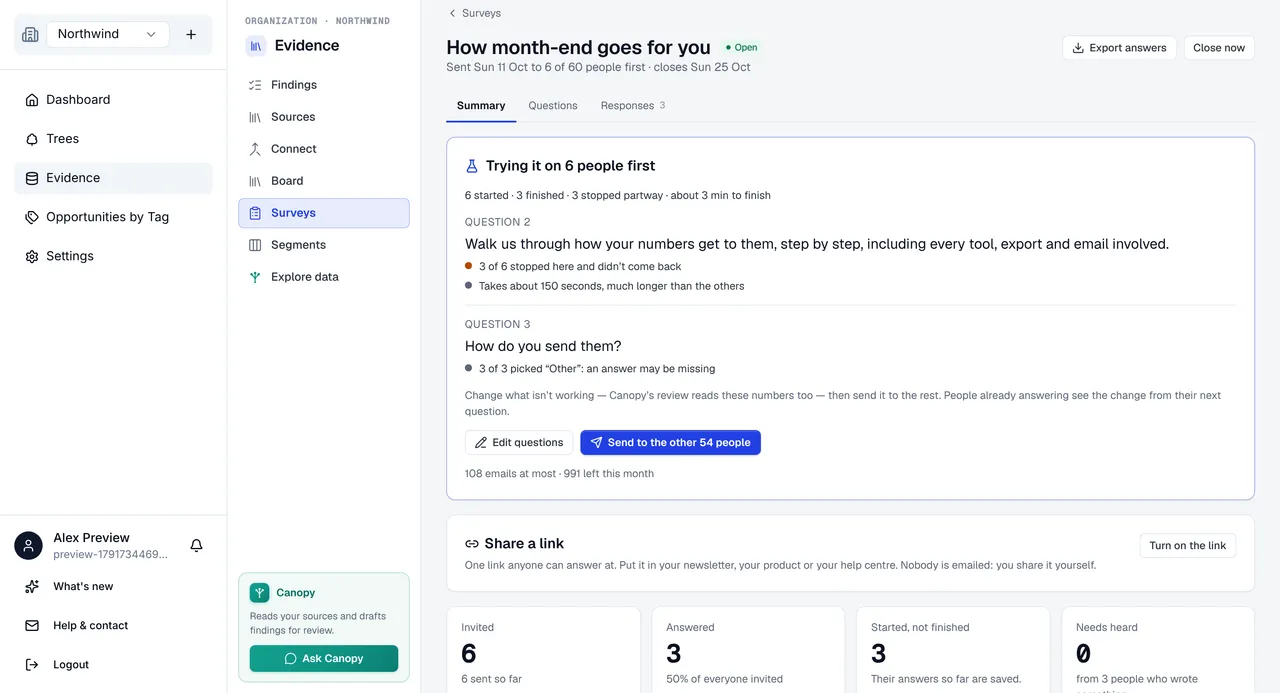
The results page opens with Trying it on N people first: how many started, finished and stopped partway, and how long finishing took. Below that, each question that stands out says why:
- …stopped here and didn’t come back: people gave up at this question.
- …skipped it: an optional question many people passed over.
- …picked “Other”: an answer may be missing: the answer people wanted to give may not be on the list.
- …said they don’t know: the question may ask something people can’t answer.
- Takes about N seconds, much longer than the others: it may be hard to read or to answer.
A small sample is easy to over-read, so a question is only flagged once at least three people reached or answered it, at least two of them did the thing flagged, and they are a real share of them. A question is flagged as slow once at least three people were timed on it and it takes at least twice as long as a typical question.
Change what isn’t working
Owners and admins can press Edit questions. The editor opens at the Questions and Message steps only: the list can’t change until everyone has been sent the survey. Review with Canopy reads these numbers too.
The people who already have the survey see your change from their next question, so nothing you type goes live until you press Done or move to the other step.
If you change what a question asks, its kind, its wording or its answers, the answers people gave to the earlier wording are kept apart. They count in no result and don’t become evidence, and the export shows “(answered an earlier wording)” in place of the answer, so they never mix with answers to the new one. A change to the help text alone doesn’t do this. A question you add counts only the people who started after you added it.
Send it to everyone else
Press Send to the other N people and confirm it’s you. You don’t confirm the list again: you did that when you sent it to the first few. The reminder then goes to everyone who hasn’t answered, counted from this send, so nobody gets two.
Still stuck? Email info@outcomify.com and a person will answer.